
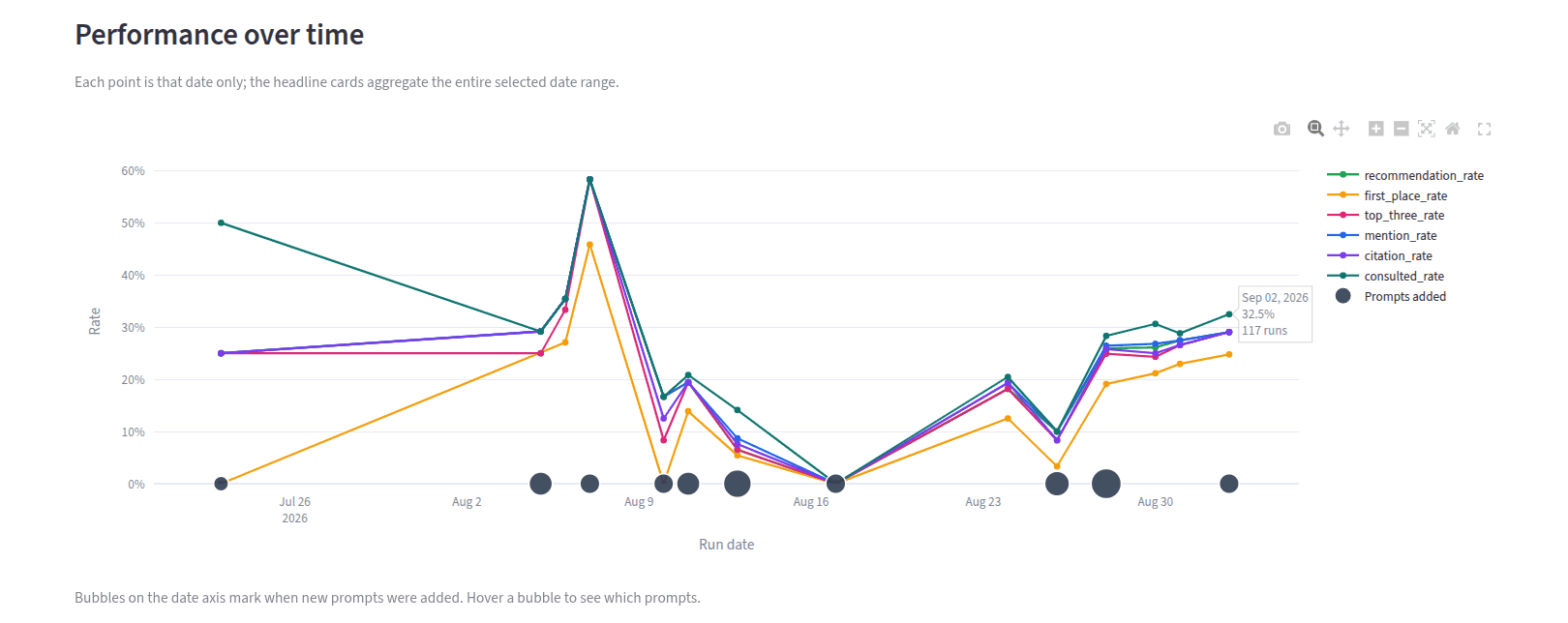
Software to simulate GEO experiments before launch should answer one question: will this change improve AI-search visibility before we put it into production? A monitoring dashboard cannot answer that. It only shows what happened after the site changed.
GEO Simulator creates a controlled alternative. It indexes your site and your competition, captures a baseline, and gives you a private playground for proposed changes. The GEO Simulator product overview explains the full measurement system. This article focuses on how the pre-launch test works and what a useful result looks like.
Why software to simulate GEO experiments before launch matters
A typical GEO test happens in public. A team rewrites a page, publishes it, and waits for rankings or recommendations to move. During that wait, competitors publish new pages, search indexes change, and generative answers vary between runs.
That makes cause and effect hard to separate. A higher recommendation rate may come from the page change. It may also come from a different source set or one unusually favorable run.
Pre-launch simulation holds the important inputs steady. The prompt set, competitor corpus, personas, and model settings remain fixed while the proposed content changes. That turns a vague before-and-after observation into a controlled comparison.
How GEO Simulator works before launch
GEO Simulator models the contest your content enters. It does not test your page alone in an empty index. Instead, it builds a representative market index and reruns the same evaluation after each proposed change.
The separate stages matter. A page can become easier to retrieve without reaching the final recommendation. It can also rank for an AI-generated search query but lose when the model compares products. Our three-stage AI search optimization framework explains how retrieval, search retrieval, and recommendation connect.
Indexing your competition makes the baseline useful
Testing one site by itself creates an easy exam. The simulator might retrieve your page because no alternative exists, not because the page deserves to win. That result will fall apart when the same content reaches a real search environment.
GEO Simulator indexes the public pages of the competitors you select. It then breaks those pages into passages and preserves the page source behind each result. Your proposed copy must compete against the same alternatives that were present in the baseline.
| What the index contains | What the simulator can test |
|---|---|
| Your current public pages | Whether the proposed version beats your existing baseline |
| Competitor pages | Whether your content wins when credible alternatives are available |
| Page and passage sources | Which page earned the retrieval position and why |
| A fixed prompt and persona set | Whether the change works across the buying situations you care about |
This is also where vague copy gets exposed. A line such as “improve your AI visibility” may sound fine on a page. Yet a competitor passage that names the audience, workflow, limitation, and proof can still outrank it. The index lets you see that gap before customers do.
The playground keeps experiments out of production
The playground is a working copy of the content you want to test. You can revise a product definition, add evidence, strengthen a comparison, or create a new page. None of those changes touch production until you choose to publish them.
The best experiments change one meaningful variable at a time. For example, add the missing answer for three lost prompts, then rerun those prompts first. A large rewrite may produce a better score, but it will not tell you which change mattered.
Start with lower-cost models for screening. They make repeated prompt runs practical and help remove weak variants early. Then test the finalists on larger models and the settings closest to your audience. Simulation is a decision tool, not a promise that every live model will behave identically.
Bring one GEO experiment to the playground
Share the prompt set, competitors, and site change you want to test. We can map the smallest useful pre-launch comparison.
Case study: first-place rate rose from 52.7% to 93.3%
One established SaaS brand used the simulator to improve its position for a fixed set of high-value prompts. The starting search first-place rate was 52.7%. After the team inspected the missed queries, revised the relevant passages in the simulator, and reran the same benchmark, the brand ranked first for 140 of 150 prompts.
That is a 93.3% first-place rate, summarized internally as 93% to 94%. The improvement was 40.6 percentage points.
| Benchmark result | Before | After |
|---|---|---|
| Search first-place rate | 52.7% | 93.3% |
| Prompts with the brand in first place | Baseline rate recorded | 140 of 150 |
| Percentage-point change | 0 | +40.6 |
The team did not publish every idea and hope for the best. It used the simulator to find queries where the brand was absent or weak, changed the passages that should answer those queries, and reran the benchmark after each batch. That made the next edit visible before it became a live-site decision.
These figures describe a controlled benchmark, not a guarantee across every model or future search index. They also measure search first-place rate, not final-answer recommendation rate. Keeping those metrics separate prevents a retrieval win from being presented as a recommendation win.
AI-search deals went from zero to six
Ranking gains matter when they create business opportunities. The same anonymized SaaS reviewed every deal created in HubSpot across two consecutive three-month windows. It found zero AI-influenced inbound deals from March 4 through June 3, 2026. From June 4 through September 4, that count rose to six.
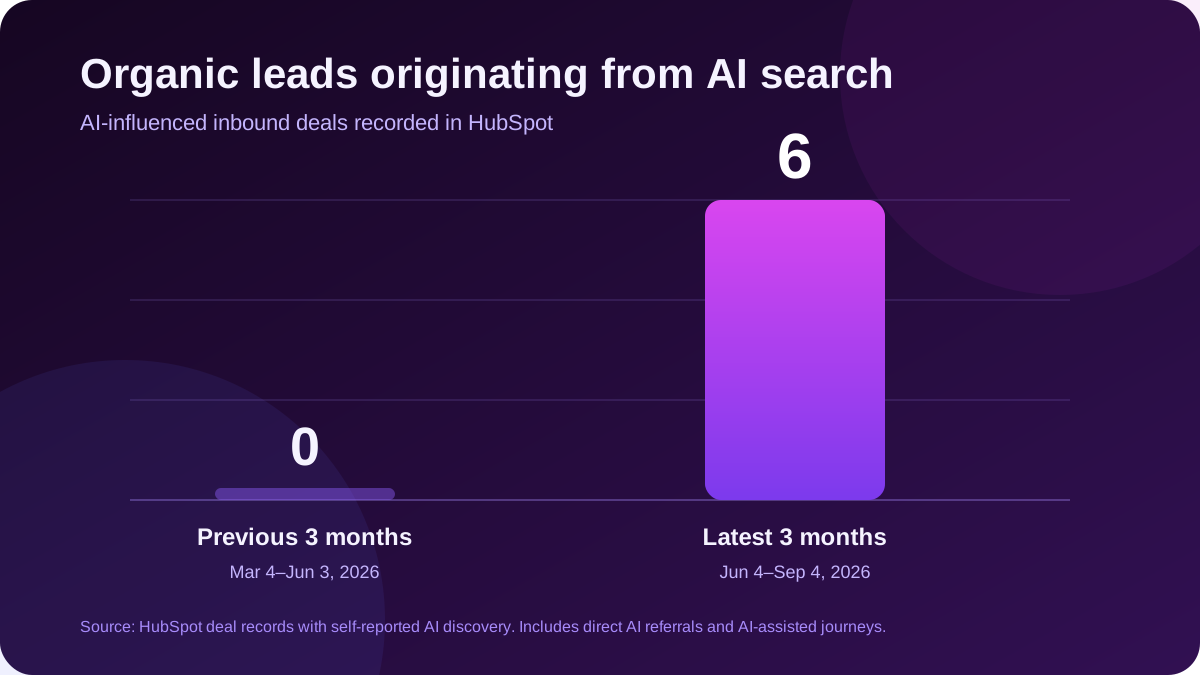
The earlier period contained 10 total deals. The latest period contained 16, and six included self-reported AI discovery in the CRM record. Three came directly through AI referrals or AI research. Three began with an AI recommendation and ended with a later branded search or paid click.
That distinction matters. Final-click attribution would hide half of the AI-influenced journeys. The chart therefore uses the CRM's meeting-source narrative, not only the automated traffic-source field.
The comparison does not prove that one simulator change caused all six deals. It does show why GEO teams need both sides of the measurement. The simulator shows whether a proposed change can improve visibility. CRM source notes show whether AI discovery is appearing in real buying journeys.
What to require from GEO experiment software
A useful GEO testing tool needs more than a prompt box and a score. Before choosing one, ask for evidence that the software can support a controlled decision.
- A fixed evaluation set: The same prompts, personas, and settings must run before and after the change.
- A competitive index: Your proposed content should compete with real public alternatives, not an empty corpus.
- A safe content playground: Teams need to test page edits without publishing them.
- Prompt-level evidence: Every average should trace back to the prompts, passages, and sources that produced it.
- Separate funnel metrics: Retrieval, search position, recommendation, mention, citation, and consultation rates should not collapse into one score.
- Model progression: Lower-cost models should screen ideas before larger models validate the strongest variants.
The simplest acceptance test is practical: can the software show which exact prompts improved, which got worse, and which page change caused the difference? A single blended score cannot support a launch decision.
GEO experiment software FAQs
›What does software for GEO experiments simulate?
It simulates how a fixed set of prompts retrieves, ranks, cites, mentions, and recommends content after a proposed site change. The test compares that result with a baseline built from the current site and competitor index.
›How is a GEO simulator different from AI visibility monitoring?
Monitoring reports what happened after publication. A simulator tests a proposed change before launch, while the prompt set and competitive corpus remain controlled.
›Does a simulated improvement guarantee the same live result?
No. Models, search indexes, and competitor pages keep changing. Simulation helps teams choose stronger experiments, while live monitoring confirms what survives in production.
›Why index competitors for a GEO test?
A competitor index gives the proposed content a realistic retrieval contest. Without it, your page may rank only because no credible alternative was available.
Start with one decision you need to de-risk
The goal is not to predict the entire AI-search market. Start with one site change and the prompts that should respond to it. Then require the simulator to show exactly what moved.
Your First Pre-Launch GEO Simulation
- Choose the decision: Name the page change you are considering and the metric it should improve.
- Define the prompt set: Select the unbranded questions and personas tied to that decision.
- Index the market: Add your current site and the competitors that appear in those buying situations.
- Save the baseline: Record prompt-level retrieval, ranking, citation, and recommendation results.
- Test one change: Apply the proposed content inside the playground and rerun the same evaluation.
- Launch only with evidence: Validate the winner on larger target models, then monitor the live result.
Test the change before it reaches your live site
GEO Simulator turns a proposed edit into a controlled before-and-after experiment.